 Sleep Tiles
The Apple Watch sleep score, explained
Since watchOS 26, Apple Watch gives each night a Sleep Score out of 100. Here's what goes into it, how to turn it on, and what to use if you want to see more than one night at a time.
How to get a sleep score on Apple Watch
Sleep Score arrived with watchOS 26 in September 2025. It needs an Apple Watch Series 6 or later, any Apple Watch Ultra or an Apple Watch SE (2nd generation) or later, paired with an iPhone 11 or later on iOS 26. Then:
- On your iPhone, open Health, tap Browse, then Sleep, and set up a sleep schedule.
- Open the Watch app, tap My Watch, then Sleep, and turn on sleep tracking (Track Sleep with Apple Watch).
- Wear the watch to bed.
The next morning the score shows in the Sleep app on the watch and in the Health app on your iPhone. Charge the watch to at least 30% before bed and wear it for at least an hour of sleep. Your score appears after you wake.
What the 100 points are made of
Apple splits the score into three parts. Each one has a fixed number of points, and the night's score is what you earned across all three.
| Part | What it looks at | Points |
|---|---|---|
| Duration | How long you slept | 50 |
| Bedtime | When you fell asleep, compared with the last 13 nights | 30 |
| Interruptions | How often you woke and how long you stayed awake | 20 |
Half the score is about length, so sleeping your full time matters most. Bedtime rewards going to bed at a similar time each night, and interruptions take points away for waking up.
Apple also labels each score with a rating, from very low to very high. The ranges behind those labels changed in watchOS 26.2, so a score that read as "OK" last year can carry a different label now. The number itself is the thing to watch.
What a single night can't tell you
The watch is good at answering "how did I sleep last night?". It's less good at the questions that come after a few weeks of scores:
- Am I sleeping better than I was three months ago?
- How many good nights have I had in a row?
- Does a late coffee or a glass of wine actually cost me sleep?
- Which nights of the week go worst, and why?
The Health app keeps every night, but mostly as charts of hours and sleep stages. To answer those questions you need your scores laid out over time, and some way to note what happened before bed.
In Sleep Tiles
Every Apple Watch night, scored and kept as a tile
Sleep Tiles reads the sleep your Apple Watch saves to Apple Health. It doesn't record sleep itself and there's no watch app to install: keep wearing your watch to bed and each night appears on your iPhone with a score out of 100 and one colored tile in your year.
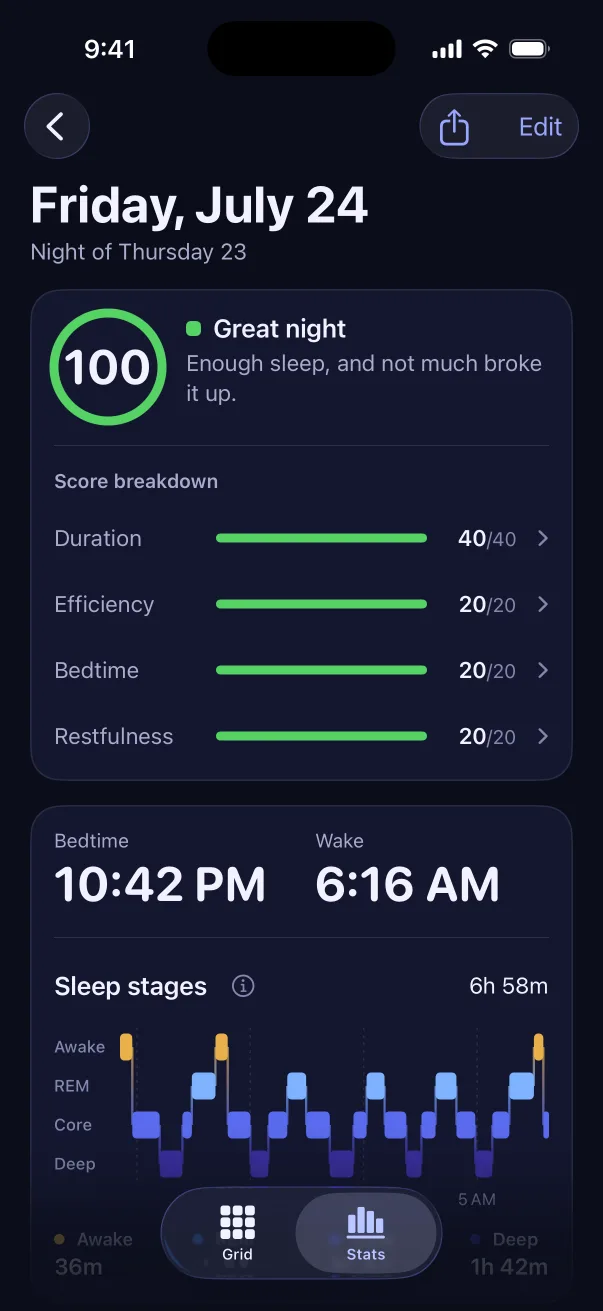
- Tap any night to see which parts earned points and which cost them
- A streak of good nights, with milestones at 3, 7, 14 and 30 nights and beyond
- Tag late caffeine, alcohol or screens in bed and see what each one does to your score
- Sleep stages hour by hour, plus overnight heart rate, heart rate variability (HRV), breathing and wrist temperature from the watch
Why the two scores can differ
Sleep Tiles works out its own score rather than copying Apple's, so the same night can get two different numbers. Sleep Tiles gives 40 points for sleeping your goal and 20 for efficiency (time asleep compared with time in bed). Another 20 are for going to bed inside a bedtime window you choose, and the last 20 for restfulness, which looks at deep and REM (rapid eye movement) sleep and how often you woke.
Neither number is the correct one. They weigh the night differently, and what helps is sticking with one and watching how it moves. The full rules, with a worked example, are in how a sleep score is calculated.
Two things that may matter to you: your bedtime window can sit anywhere on the clock, so night shifts and late schedules score fairly, and the same score works with an Oura Ring, WHOOP or Garmin if you ever switch. Old nights keep the score they were given. See how to get Oura, WHOOP and Garmin sleep into Apple Health.
Choosing a sleep app for Apple Watch
There are two kinds of Apple Watch sleep app. Some, like AutoSleep, run their own tracking on the watch and save the result to Apple Health. Others, like Sleep Tiles, read whatever is already in Health. The two can work together: an app that reads from Health will pick up nights from a tracking app too.
Whichever you try, a few things are worth checking:
- Does it explain its score, or only show a number?
- Can you see months of nights at once, not just this week?
- Where does your sleep data go? Sleep Tiles keeps it on your iPhone, with no account and no ads.
- What does it cost after the download? Sleep Tiles is free to download and needs a subscription to use.
