 Sleep Tiles
How a sleep score is calculated
A sleep score squeezes a whole night into one number. Every tracker weighs the night differently, but most use the same few measurements. Here's what they are, and the exact formula Sleep Tiles uses, with a worked example.
What goes into a sleep score
Most trackers don't publish their full formula, but these are the usual inputs:
- Duration. How long you were asleep, usually compared with a target such as 7 or 8 hours.
- Efficiency. Time asleep divided by time in bed. Seven hours asleep out of eight in bed is 87.5%.
- Timing. When you went to bed, often compared with your usual bedtime or a window you set.
- Interruptions. How many times you woke during the night.
- Sleep stages. How much of the night was deep and REM (rapid eye movement) sleep. Watches and rings estimate stages from sensor data such as movement and heart rate, so treat them as estimates rather than lab measurements.
The differences between apps come from which of these they use and how many points each one is worth. Apple Watch, for example, gives 50 points to duration, 30 to bedtime and 20 to interruptions (more in the Apple Watch sleep score, explained). That's why two apps can give one night two different scores.
The Sleep Tiles formula
Sleep Tiles scores each night out of 100 from four parts. Between the "full points" and "no points" lines, points fall in a straight line, and the total is rounded to a whole number.
| Part | Full points, and when it reaches zero | Points |
|---|---|---|
| Duration | Full when you sleep your goal (8 hours by default). Zero at 3 hours under it. | 40 |
| Efficiency | Full when you're asleep for 90% or more of your time in bed. Zero at 70% or less. | 20 |
| Bedtime | Full when you go to bed inside your bedtime window (10:30 to 11:30 PM by default). Zero at 90 minutes outside it. | 20 |
| Restfulness | 12 points for deep and REM sleep: full at 40% of your time asleep, zero at 15%. 8 points for wake-ups: full at 2 or fewer, zero at 8. | 20 |
Duration carries the most weight because Sleep Tiles treats getting enough sleep as the main thing. Bedtime is measured around the clock, so a window of 8 to 9 AM after a night shift works the same way as one at 10:30 PM.
A worked example
Take the default settings: an 8 hour goal and a bedtime window of 10:30 to 11:30 PM. One night looks like this:
In bed at 11:48 PM, up at 7:48 AM. That's 8 hours in bed and 6 hours 48 minutes asleep. Deep and REM sleep made up 40% of the time asleep, with 5 wake-ups.
- Duration: 24 of 40. The night was 1 hour 12 minutes short of the goal. Points run out at 3 hours short, so 60% of the range is left, and 60% of 40 is 24.
- Efficiency: 15 of 20. 6 hours 48 minutes out of 8 hours is 85%. That's three quarters of the way from 70% to 90%, so it earns three quarters of 20.
- Bedtime: 16 of 20. The window closed at 11:30 PM and bedtime was 18 minutes later. 18 of the 90 allowed minutes is 20%, so the part keeps 80% of its 20 points.
- Restfulness: 16 of 20. 40% deep and REM earns the full 12. Five wake-ups is three past the free two, halfway to the limit of eight, so wake-ups earn 4 of 8.
24 + 15 + 16 + 16 = 71. That clears the default bar of 70, so it counts as a good night and keeps a streak going. Its tile gets the second-best shade, for 70 to 84.
When part of the night is missing
Not every source records everything. If a night has no sleep stages, for example from a sleep app that records only asleep and awake, restfulness is left out and the other three parts are scaled up to 100. The example night without stage data would be 55 out of a possible 80, which scales to 69.
Nights you log by hand have no time in bed, so efficiency is left out the same way. Instead of stage data, they use how rested you felt, rated 1 to 5, for restfulness.
Changing the rules to fit you
Three settings decide what a good night is: your sleep goal, your bedtime window and the score that counts as good. A 7 hour sleeper can set a 7 hour goal and stop losing points every night for something that isn't a problem for them.
Changing your goal or window only rescores nights that aren't final yet. A night is final by 6 PM on the day you wake up, and after that it keeps its score, so a goal that changes with your life doesn't rewrite last year. The good-night bar is different: it applies to every night, because it decides streaks rather than scores.
In Sleep Tiles
Every score comes with its breakdown
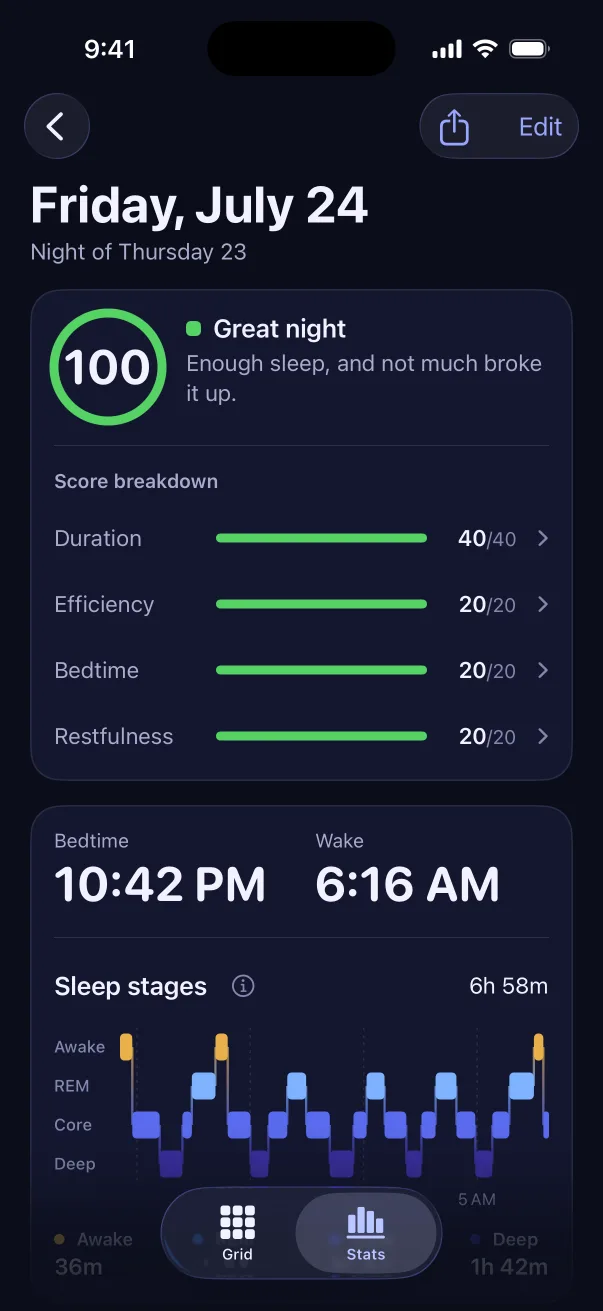
Tap any night to see the four parts and the points each one earned. Tap a part to see that night's numbers against the target, what would have earned full points, and your average for it over the last 30 nights.
- Shades for every score: under 50, 50 to 69, 70 to 84, and 85 and up
- A plain explanation of each part and each sleep stage, one tap away
- Works from what your Apple Watch, Oura, WHOOP, Garmin or sleep app saves to Apple Health
What a score is good for
A single score is a rough summary. It's more useful as a trend: whether your average is climbing, which nights of the week fall short, and what you did on the nights that went badly. Sleep Tiles reads your sleep from Apple Health rather than recording it, so the score is only as good as the tracker behind it, and it isn't a medical measurement.
